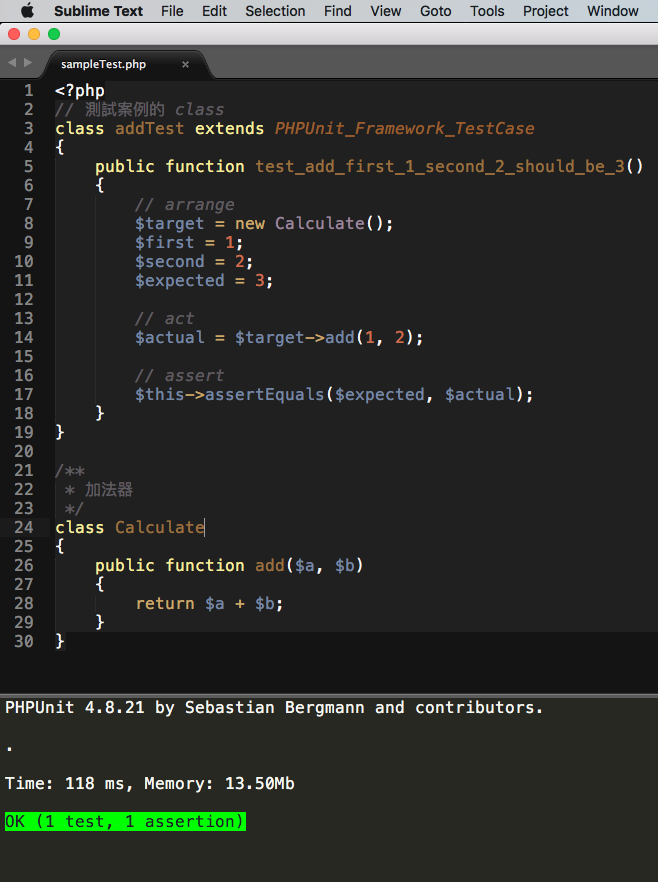
步驟
1. 安裝 套件 phpunit kit
2. 安裝套件 fix mac path
3. 在 sublime 設定檔加上 "additional_path_items": [] ,以後加上你 phpunit 的路徑
wbkuo 發表在 痞客邦 留言(0) 人氣(60)
功能
讓你快速跳到目前 function 定義的檔案及位置
安裝
1. 輸入 Ctrl + Shift + P,輸入 install,選擇 [Package Control: Install Package] (如果你尚未安裝 Package Control 請參考這裡)
2. 輸入 Go To Definition,按 [Enter]
使用
1. 將游標停在你要查詢的 function name 上面,按 [F12]
2. 如果位置確定的話會直接開啟檔案,如果不確定會讓你選擇檔案
wbkuo 發表在 痞客邦 留言(0) 人氣(3,119)
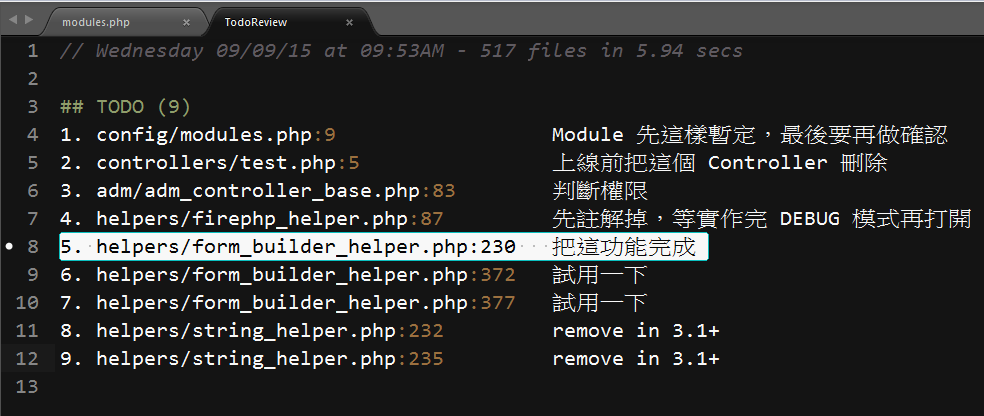
功能
讓你可以快速瀏灠整個專案的 todo 註解,並快速跳到註解的檔案
安裝
1. 輸入 Ctrl + Shift + P,輸入 install,選擇 [Package Control: Install Package] (如果你尚未安裝 Package Control 請參考這裡)
2. 輸入 TodoReview,按 [Enter]
使用
1. 輸入 Ctrl + Shift + P,輸入 todo,選擇 TodoReview: Project Files
2. TodoReview 會掃描整個 Project 目錄(請先開啟某個 sublime 專案)
3. 在畫面上選擇某個 todo 按 [Enter] 會直接開啟檔案並跳到 todo 註解的位置
wbkuo 發表在 痞客邦 留言(0) 人氣(401)
參考:
http://www.cnblogs.com/lhb25/archive/2013/05/02/sublimelinter-for-js-css-coding.html
http://www.liudon.org/?p=1046
wbkuo 發表在 痞客邦 留言(0) 人氣(387)
快速尋找 function
Ctrl + R
快速找到變數
Ctrl + P + #
wbkuo 發表在 痞客邦 留言(0) 人氣(1,217)
1. Alignment
幫助對齊程式碼的工具
2. Bracket Highlighter
強化目前區塊的高亮
3. Encoding Helper
因為 Sublime 預設只能看 UTF-8 格式的編碼,裝上之後才能將看其他編碼
4. Packaget Control
裝助 Sublime 安裝及移除套件
5. DocPHPManualer
快速查詢和搜尋 PHP 文件
ctrl + alt + d 找目前游標的 function
ctrl + alt - s 搜尋 php 文件
wbkuo 發表在 痞客邦 留言(0) 人氣(92)
找了好久,終於找到了,在偏好設定
// Exiting the application with hot_exit enabled will cause it to close
// immediately without prompting. Unsaved modifications and open files will
// be preserved and restored when next starting.
//
// Closing a window with an associated project will also close the window
// without prompting, preserving unsaved changes in the workspace file
// alongside the project.
"hot_exit": true,
// remember_open_files makes the application start up with the last set of
// open files. Changing this to false will have no effect if hot_exit is
// true
"remember_open_files": true,
wbkuo 發表在 痞客邦 留言(0) 人氣(36)

 程式設計 (22)